
Anthropic states that old prompting practices are reducing the speed of Claude Opus 5.5
Claude Opus 5.5 works better when users describe outcomes, use Medium effort, drop old phrases, attach files, and specify design needs directly.
Key Takeaways
- Anthropic says Claude Opus 5.5 no longer needs older prompting phrases like “think hard”; users should describe the desired outcome and choose an appropriate effort level.
- Start with the default Medium effort setting; Anthropic says Opus 5.5 on Medium can match Opus 5 on High, while higher settings cost more and do not always improve results.
- Give the model one clear goal-oriented prompt covering the desired result, output format, and when it should ask questions, rather than sending instructions one by one.
- Use attachments such as images, diagrams, and files instead of manually transcribing content, and ask for finished documents or spreadsheets directly when possible.
- For better design and customization, specify unwanted styles precisely and connect Claude to relevant files or systems so it can use more context to complete tasks in fewer steps.
Anthropic's Claude Opus 5.5 prompting advice is clear: users should drop several habits carried over from older model generations because the model, now the default on Pro, Max, Ultra, and Team plans, works differently from its predecessors. The core change is simple: describe the outcome you want, choose an appropriate effort level, and stop forcing the model with older reasoning phrases.
Background: Why older phrases were used
About a year and a half ago, reasoning models were less standardized. Prompts such as "think hard" or "think carefully" could sometimes coax more performance out of a model or steer the router, according to Anthropic. That period came before today's standard adaptive reasoning.
For Claude Opus 5.5, Anthropic says the model always reasons on its own and scales reasoning depth to the task and the selected effort level. In company tests, responses without the older phrases started faster with no measurable drop in quality. The phrase "effort level" refers to a setting that controls how much reasoning depth the model allocates.
Development: Effort levels, cost, and model choice
Anthropic recommends starting at "Medium", the default effort level for Claude Opus 5.5. In internal tests, Claude Opus 5.5 on Medium matched the performance of its predecessor Opus 5 on "High". Higher settings cost more and do not always produce better results, Anthropic says. The company advises switching to High only when Medium is not enough. Users can change the setting in the model menu next to the send button.
This also affects teams that previously used the cheaper Sonnet model and reserved Opus for complex projects. Anthropic argues that a more capable model can finish a task in fewer steps, which can partly offset its higher per-token price. Anyone who regularly cranks Sonnet to "Extra High" or "Max" effort ends up paying about as much as with Claude Opus 5.5, according to the company.
Progress: From chatting to setting goals
Anthropic advises describing the desired result in a single message rather than giving instructions one at a time. The prompt should cover the goal, the output format, and when the model should check back with questions. Claude Opus 5.5 is better than its predecessor at seeing multi-part tasks through, Anthropic says. The model can increasingly take over the back-and-forth that users used to handle in chat, sometimes doing it better, and can effectively prompt itself from a single initial input.
Latest workflow: Files, images, documents, and design
The company recommends attaching diagrams and tables as images or files instead of typing them out. Workarounds that older models required, such as manually transcribing chart values, are no longer needed, Anthropic says. Users who need a finished document or spreadsheet should ask for it directly instead of requesting a draft first. Claude Opus 5.5 often goes from request to finished product in a single pass, according to the company.
Image reading also improved significantly in Claude Opus 5.5. Even at the lowest effort level, it read values from dense charts more accurately than Opus 5 at the highest, Anthropic says.
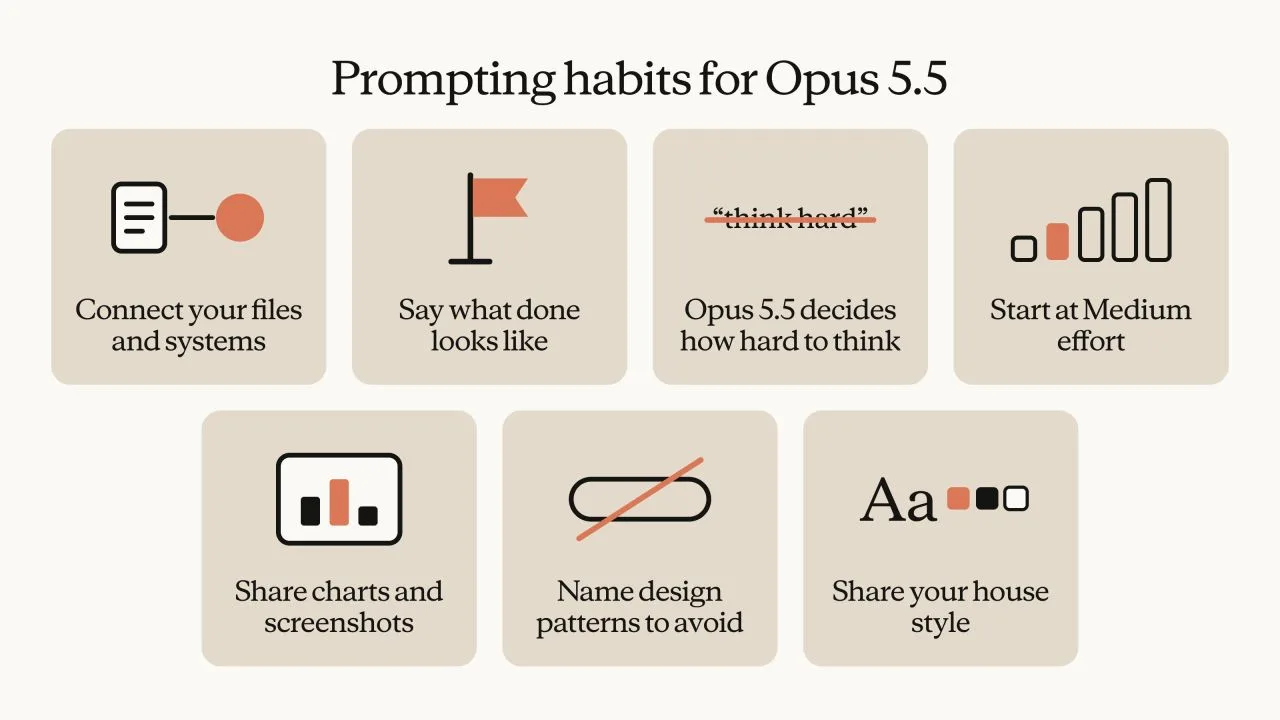
For design tasks, Anthropic recommends naming unwanted styles specifically, such as a cream-colored background or pill-shaped buttons, rather than vaguely banning "generic design". General instructions only swap one default style for another, the company says. Users who connect Claude to their own files and systems through connectors get significantly more tailored results, because the model can pull in the information it needs on its own. Anthropic's broader prompting tips include connecting files and systems, describing the desired end result, dropping "think hard", starting at Medium effort, sharing diagrams directly, naming unwanted design patterns, and sharing your own house style.
The current stage of the change is less about squeezing more reasoning out of the model and more about giving it enough context, choosing the right effort level, and letting it complete tasks in fewer steps.
Meta description: Anthropic advises Claude Opus 5.5 users to drop think hard prompts, start at Medium effort, describe goals, use files, connectors, and design style details.
Tags: Claude Opus 5.5, Anthropic, prompting, reasoning models, AI productivity
Featured image: Abstract technology scene with layered interface panels, soft blue and amber lighting, no people, no logos, no text.
Comments
No comments yet. Be the first to comment.